No VM · No fake Chrome browser · No JS injections · For macOS · Safari-native

Safari profiles that actually stay separate.

SatMac doesn't patch the browser. It rebuilds the environment each profile lives in — network, hardware identity, and OS signals — from the kernel up.

SatMac main interface showing isolated Safari profile cards
How it works

Separation that holds up to real fingerprinting

SatMac runs every Safari profile in a fully isolated macOS environment — its own router VM with unique MAC and hardware fingerprint, choice of 5 tunneling protocols, native OS-level geolocation via CoreLocation, twelve randomized hardware identity fields per profile, and a Signal Bucket fingerprint isolation system that protects against bucket-pattern tracking.

Per-profile router identity

Every profile gets its own router MAC, model, and hardware fingerprint — routed through a dedicated Linux VM, not a browser extension or proxy plugin.

5 tunneling protocols

Direct, SOCKS5, WireGuard, OpenVPN, or VLESS. Kill switch blocks traffic if the tunnel drops. IPv6 and DNS leak protection are on by default.

OS-level geolocation

Native CoreLocation override sets timezone, language, and coordinates to match the proxy's country. No JavaScript tricks — the OS itself reports the new location.

⟨⟩

Signal Bucket fingerprint isolation

Modern fingerprinters don't compare single hashes — they look at the bucket pattern a machine produces across thousands of measurements. SatMac generates a unique 60–110-hash drift bucket per profile, with 80–95% of hashes unique to that profile and only 5–20% overlap with the underlying Mac.

Original device baseline

A silent one-time calibration measures what your real Mac looks like to a fingerprinter. Every profile is then compared against that baseline so you can see exactly how far each profile has drifted. Runs in the background at first launch, never asks the user.

Per-profile hardware identity

Twelve Apple-realistic fields randomized at profile creation — platform serial, UUIDs, NVMe ID, EDID display data, hostname, computer name, MAC addresses, Bluetooth ID, uptime offset. All coherent with the chosen device preset.

What you'll use

Built for people who run many accounts

Affiliate managers, OSINT researchers, multi-account operators. If your income depends on not getting your accounts linked, this is what it looks like:

Grid of Safari profiles with colored identifiers, groups in the left rail
All your isolated environments at a glance. Each colored card is one Safari profile with its own router VM, IP, hardware identity, and Signal Bucket. The left rail groups profiles by purpose — Amazon sellers, eBay accounts, email inboxes — so a hundred profiles stay navigable. Click Run and a fresh Safari window opens, fully isolated. Click again and the VM cleanly tears down.
New profile dialog with twelve randomized hardware identity fields
When you create a new profile, SatMac randomizes twelve Apple-realistic hardware fields and persists them per-profile: platform serial number (matching Apple's actual serial format and length), hardware UUID, NVMe drive serial, EDID display data (vendor ID, product ID, manufacture week and year), system hostname, computer name, full user name, en0 / en1 / Bluetooth MAC addresses, and a kernel uptime offset so two profiles started at the same moment report different boot times. All twelve are kept coherent with the chosen device preset — a MacBook Pro 14" profile gets a serial that matches Apple's actual MacBook Pro serial format, a display EDID that matches Apple's actual built-in display, etc. Not Frankenstein hardware; a believable Mac.
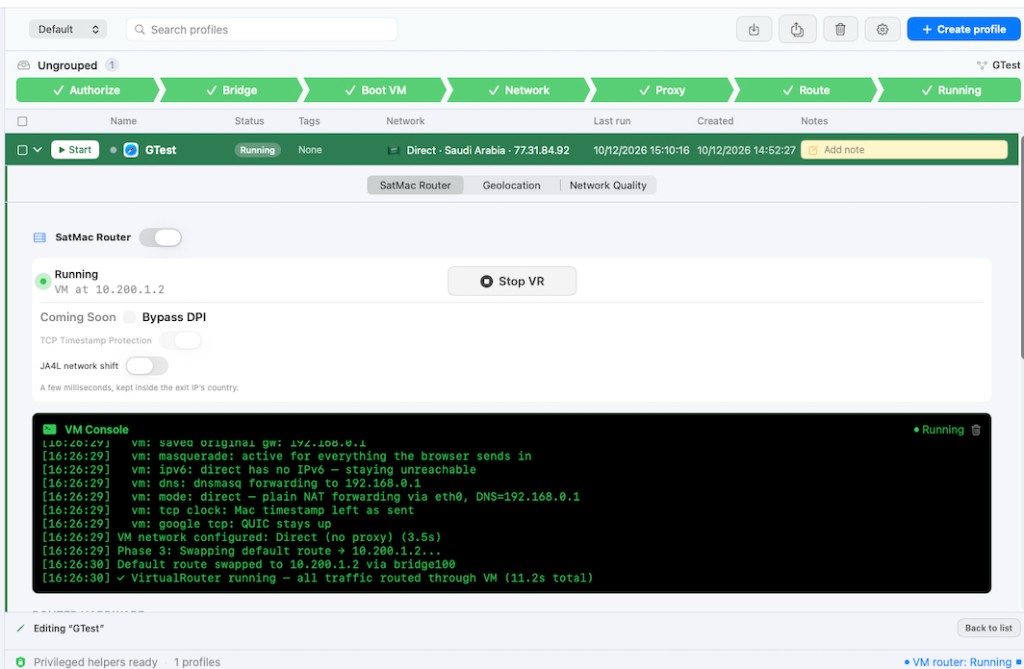
SatMac Router showing live VM console with SOCKS5 routing configured
Every profile launches through its own Linux VM acting as a virtual router. The VM has its own MAC address, vendor identity (Eero, ASUS, Netgear, TP-Link…), TTL signature, and connection-type fingerprint. Safari sees that VM as its upstream gateway — not your real router. Pick the protocol that fits the workflow: Direct (no proxy, just the VM identity), SOCKS5, WireGuard, OpenVPN, or VLESS. Each profile picks independently. If the tunnel drops, the kill switch blocks traffic at the VM level.
Location detection showing Saudi Arabia with city map and residential address
SatMac uses Apple's native CoreLocation simulation API — macOS itself reports the spoofed location to Safari. Timezone, language, system region, and a real residential address inside the detected city are all set coherently. The OS believes it's there. Safari has nothing else to ask.
Signal Bucket showing per-profile drift bucket with Clock Skew and GPU Thermal axes
Single-value fingerprinting is dead. Modern trackers measure a machine and look at the distribution of the results. Same Mac, same browser, same network → same shape of bucket every time. SatMac's Signal Bucket system generates a fresh per-profile bucket across multiple hardware-derived axes (clock skew, GPU thermal noise) and shifts the distribution so each profile produces a unique pattern. Target: 80–95% of hashes in each profile's bucket are unique to that profile, with only 5–20% overlap to the underlying Mac. That's enough divergence that the same physical machine looks like multiple different machines to a bucket-matching tracker.
Compare Profiles showing 7% leak between profile and original device
Pick a profile, compare it against either another profile or against the Original device baseline. The "leak%" at the top tells you the truth: 7% means this profile shares only 7% of its bucket with the original Mac — that's isolation working. Green is good (≤ 15%), orange is concerning (15–60%), red means a fingerprinter could likely link those profiles (> 60%). The three columns show exactly which hashes are shared and which are unique to each side, so you can debug what's still leaking.
Network Quality checks showing UDP, QUIC, DNS, DNSSEC, and TCP fingerprint results
Before you trust a proxy, verify the path actually works the way it should: does it support UDP, does QUIC/HTTP/3 negotiate, what DNS server is the request resolving through, does DNSSEC validate, and does the TCP fingerprint look like the operating system you're claiming to run? All five checks run in seconds.
Warm-up batch job with per-profile country and sites-to-visit settings
The Warm-up job runs every profile through a realistic site set for the country it's assigned to (search engines, news, social, e-commerce), with configurable dwell time, jitter, and total site count. Built-in cookie-banner acceptance. Run it overnight before launching real activity.
Pricing

Pay in crypto. No recurring billing.

One payment, one term. Renews manually when it expires. BTC, ETH, USDT, LTC, and 100+ coins supported.

Loading plans…

Payments processed by NOWPayments. Your subscription activates automatically once the blockchain confirms.